
Make SQL RESTful with OCI Database Tools Runtime
The Database Tools service in Oracle Cloud Infrastructure (OCI) has supported a REST-enabled SQL endpoint since launch, but this was not well documented and is not supported outside of the Database Tools SQL Worksheet. In mid-2026, Database Tools added a new data plane where:
- The new data plane is RESTful.
- It executes SQL statements and returns JSON results over HTTP.
- Execution can be synchronous or asynchronous (with Object Storage input/output).
- All of the standard OCI interfaces (i.e. the CLI, generated SDKs, and Terraform) are supported.
There are, of course, other new features in this data plane but in this post I will focus on statement execution via CLI.
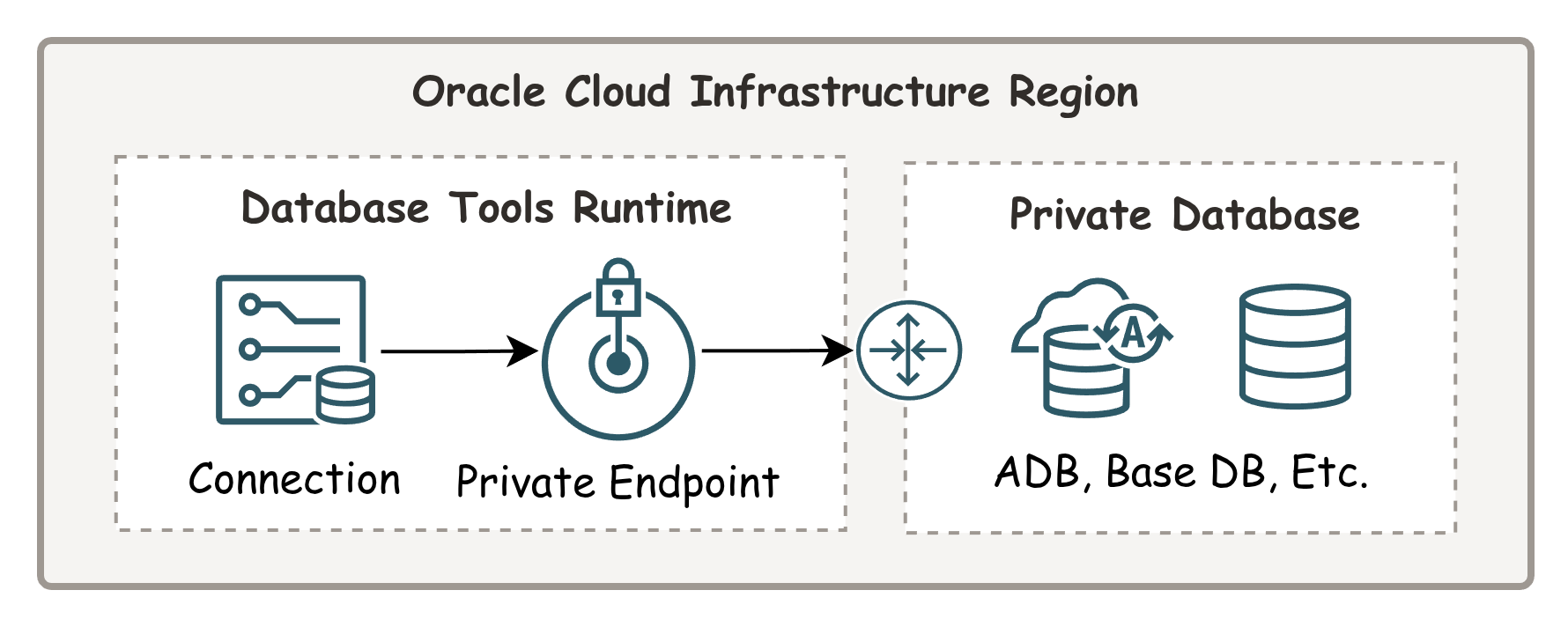 Example of OCI resources involved with executing SQL using the Database Tools Runtime.
There are helpful details in the documentation and the generated Java SDK:
Recent generations of large language models (LLMs) are very okay-ish at using these sources to help craft specific scenarios and I suspect they will only get better at this task. Even if you are not the programmer type, you should still keep links to the documentation handy.
Running Your First Statement
First, let us look at using the OCI command line interface (CLI) to run statements. Here is a link to documentation about using the relevant commands:
From here on, I assume you already have the OCI CLI installed and a valid Database Tools connection to run statements. If not, this is a good time to pause and go create a new connection and validate it. For that, you can find blog posts on this site or the official documentation.
In these examples, I am also using a DEFAULT profile configured in an OCI CLI configuration file. For this reason you will not see any --profile or --auth parameters being passed but you should add those to your experiments as needed. You know your own set up better than I do!
Note: Escaping complex strings for command-line execution is difficult to keep straight at best and not portable across different operating systems and shells. Instead, here I take the path of least resistance and suggest that you do the same.
Create a new text file called example.json and add the following text. (If you are using MySQL instead of Oracle Database adjust your query syntax accordingly.)
{
  "type": "STANDARD",
  "statementText": "select 'hello, world' as GREETING from dual"
}
Contents of example.json
Note about the parameters:
The type parameter could be STANDARD, BATCH, or SCRIPT. This is one of those instances where OCI CLI documentation for “complex types” is not very useful, but if you cross-reference the CLI and generated SDK documentation, you can find it all there. In this case the documentation for values supported by type is here.
The statementText parameter is exactly what it sounds like. This is your SQL to execute. In addition to type and statementText, there are other options supported but we will keep it high-level for now. The documentation for other parameters of STANDARD execution type can be found here. In particular, you might find pagination related settings interesting.
Once you have a connection and the example.json you can then run the SQL statement:
oci dbtools-runtime connection execute-sql sync --connection-id <your-ocid-here> --request-input file://example.json
The result is a JSON response with a single statement that looks like this:
{
  "data": {
    "env": {
      "default-time-zone": "UTC"
    },
    "items": [
      {
        "binds": null,
        "dbms-output": null,
        "error": null,
        "properties": null,
        "responses": null,
        "result-set": {
          "count": 1,
          "has-more": false,
          "items": [
            {
              "greeting": "hello, world"
            }
          ],
          "limit": 10000,
          "metadata": [
            {
              "column-type-name": "CHAR",
              "database-column-name": "GREETING",
              "is-nullable": true,
              "precision": 12,
              "scale": 0,
              "unique-column-name": "greeting"
            }
          ],
          "offset": 0
        },
        "result-set-object": null,
        "results": null,
        "statement-id": 1,
        "statement-pos": {
          "end-line": 1,
          "start-line": 1
        },
        "statement-text": "select 'hello, world' as GREETING from dual",
        "statement-type": "QUERY"
      }
    ],
    "type": "STANDARD",
    "version": null
  },
  "opc-work-request-id": "ocid1.databasetoolsrtworkrequest.oc1.phx.aaaaaaexampleocid"
}
Example output from running a simple statement using the Database Tools Runtime
This output is pretty verbose but not at all unexpected for a REST API response used to execute SQL statements. The service supports pagination, SQL binds, multiple statements, database errors, metadata, etc. Some fields are present for backward compatibility with other systems and thus, not all fields here are equally useful.
Running Multiple Statements
Now add an additional statement to example.json:
{
  "type": "STANDARD",
  "statementText": "select 'hello, world' as GREET_WORLD from dual; select 'hello, dbtools!' as GREET_DBTOOLS from dual;"
}
Updated contents of example.json
And then re-run the SQL statements using the same CLI syntax as you used above with the single statement. You should see a JSON response that now contains multiple response items. For example:
{
    ...
    "items": [
      {
        ...
        "result-set": {
          "count": 1,
          "has-more": false,
          "items": [
            {
              "greet_world": "hello, world"
            }
          ],
          ...
      },
      {
        ...
        "result-set": {
          "count": 1,
          "has-more": false,
          "items": [
            {
              "greet_dbtools": "hello, dbtools!"
            }
          ],
          ...
      }
    ],
    "type": "STANDARD",
    "version": null
  },
  ...
}
Example output from running multiple statements using the Database Tools Runtime
As you can see, now we have multiple result-sets (one for each statement) in the response. If your statements generated multiple rows you would, of course, see multiple records in each result-set[].items array. Keep in mind that, with pagination, the service will re-execute statements when requesting additional pages. If your query results in a very large result-set then it would be worth disabling pagination, or even better, use asynchronous output to Object Storage instead.
Saving Results to Object Storage (Async Execution)
There are times when you might prefer to have your result-set written to an Object Storage bucket instead of being streamed to a terminal window. This is a great option for large queries that would benefit from running in the background, asynchronously. Create a new file called async-output.json and add the following content:
Note: Replace the Object Storage placeholders with your own values.
{
  "type": "OBJECT_STORAGE",
  "object": {
    "namespace": "<your-namespace>",
    "bucketName": "your-bucket-name",
    "objectName": "results/response-output.json"
  },
  "resultDispositionTemplates": [
    {
      "statementType": "QUERY",
      "objectTemplate": {
        "type": "OBJECT_STORAGE",
        "namespace": "<your-namespace>",
        "bucketName": "your-bucket-name",
        "objectName": "results/query-output.json",
        "contentType": "application/json"
      }
    }
  ]
}
Contents of async-output.json
Note, different statement types can have different disposition templates. This allows you to write results to different files in your output. The types can be found in the API documentation here. If you have multiple statements in your query you can also have different files generated in the output by using a special placeholder in the objectName field of your objectTemplate. The documentation notes this here.
Caution: Make sure to specify different
objectNamevalues for the top-levelobject.objectNameversus theobjectTemplate.objectName. These serve different purposes and using the same name will likely cause unexpected behavior.
Create a new file with the query to execute called async-input.json and add the following content:
{
  "type": "INLINE",
  "content": {
    "type": "STANDARD",
    "statementText": "select 'hello, world' as ASYNC_GREETING from dual"
  }
}
Contents of async-input.json
I am using
INLINEfor simplicity, but as a more advanced use-case, it is also possible to specify a file in Object Storage with queries to execute by providing the location. This is documented here.
Once you have these two files created we can use the OCI CLI to execute the query asynchronously and to save the result to Object Storage. For example:
oci dbtools-runtime connection execute-sql async --connection-id <your-ocid-here> --request-input file://async-input.json --request-output file://async-output.json
When I run this I get an immediate response from the CLI with a work request ID:
{
  "opc-work-request-id": "ocid1.databasetoolsrtworkrequest.oc1.phx.aaaaaaaaexampleworkrequestid"
}
I can then use this work request ID to monitor the status of the asynchronous job. For example:
oci dbtools-runtime work-request get --work-request-id ocid1.databasetoolsrtworkrequest.oc1.phx.aaaaaaaaexampleworkrequestid
{
...
    "status": "SUCCEEDED",
...
}
You can also see the status of work requests in the OCI console for the connection used:
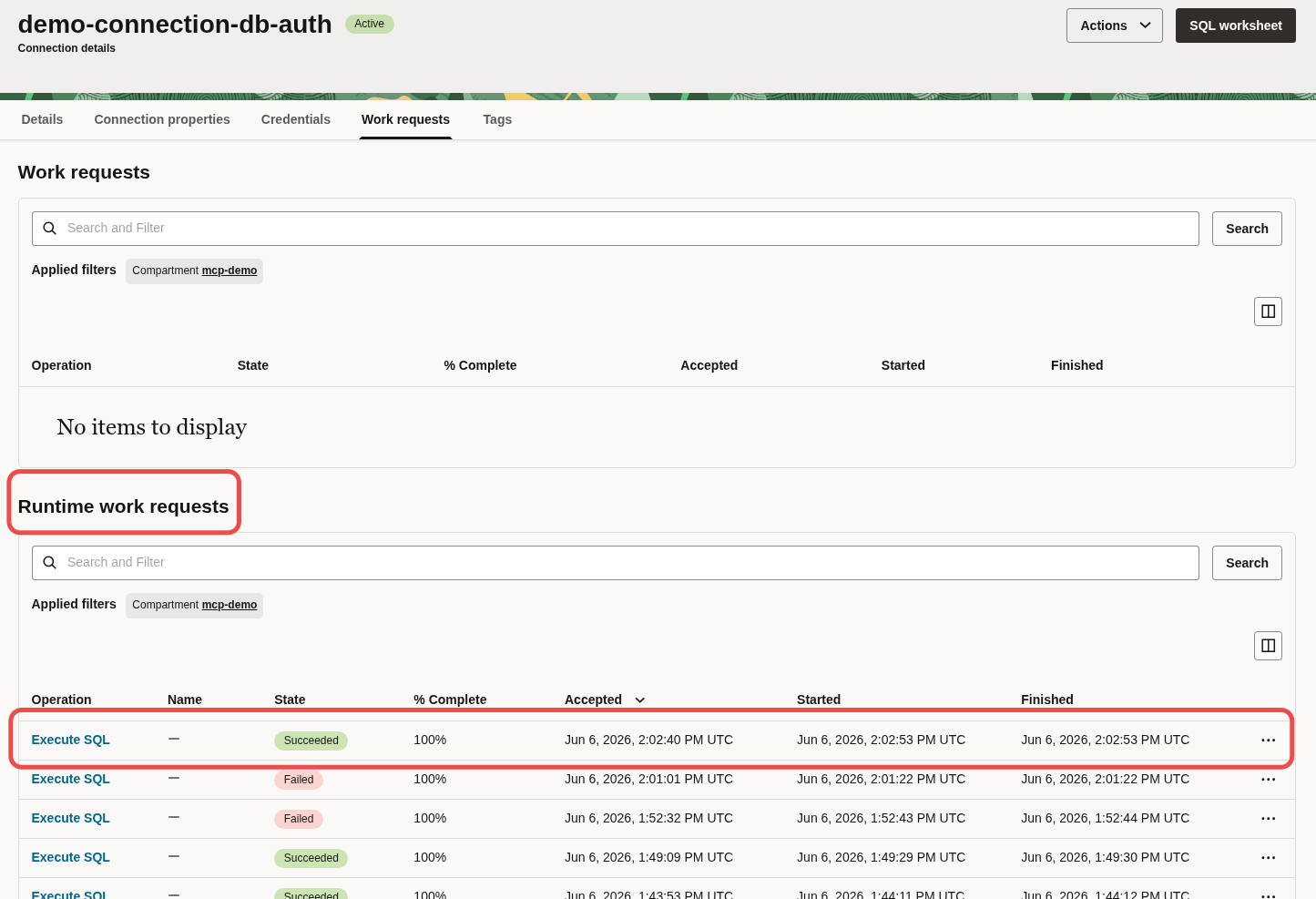 Example of viewing Runtime work requests in the OCI console
And finally, here is an example of the results in an Object Storage bucket:
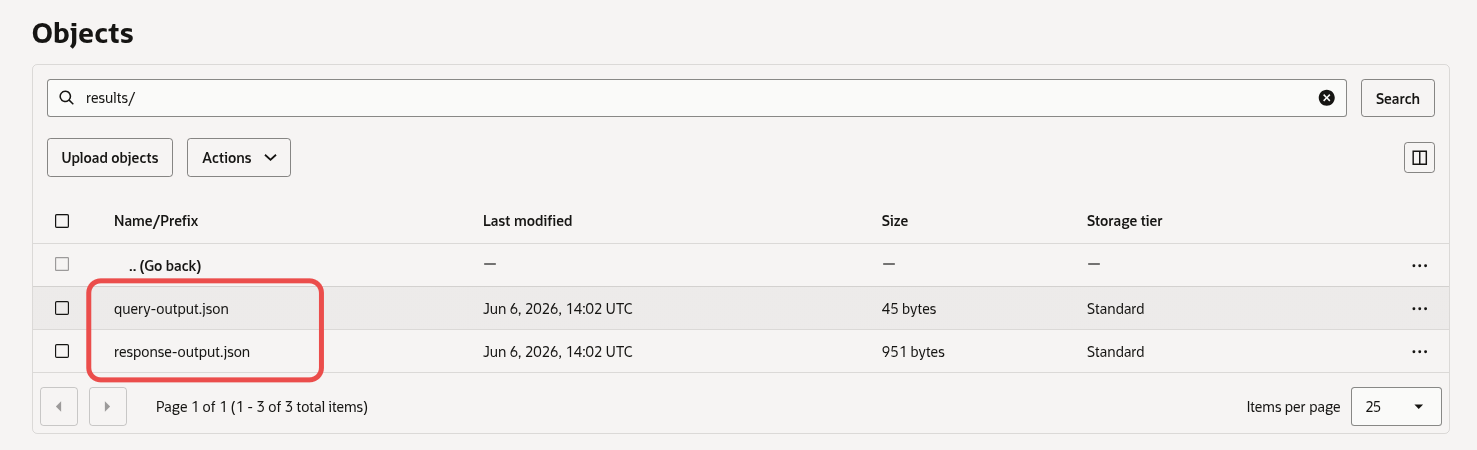 Example of the asynchronous SQL execution results written to object storage.
Looking at query-output.json I see the following:
{"items":[{"async_greeting":"hello, world"}]}
This is awesome!
I do not file documentation bugs on a Saturdays (I hit a few) but I just want you to know that I see it and I will work with the Database Tools team to get them updated. If you find issues please report them to Oracle Support or find DBTools people on social media. In the meantime, I hope this post helps you on the way to figuring out how to set things up.
Why Would We Use This? (Some Ideas)
OCI Database Tools primarily creates tools for developers to work with databases in Oracle Cloud. Interacting with a database using a CLI and getting responses back in JSON format might not seem useful if you are an analyst or need direct access to traditional database tools like SQL Developer or SQL Developer Next in VS Code. What we saw in this post does not serve the same purpose!
For developers and system integrators working with data in the cloud, this service offers some great tools. Here are just a few ideas:
- Run statements against a database in a private subnet
- Automate gathering of statistics via batch-style jobs
- Schedule execution of some routine in a database triggered by external systems without direct access to the database
- Set up a data extract process that dumps small data sets to disk (in JSON format) or larger data sets to Object Storage
- Call remote PL/SQL procedures in your database using a REST API
- and so on…
You probably have other use cases in mind. Try it out! Having access to this CLI is a nice side-effect of creating an OCI compliant data plane. We get generated SDK and CLI commands that follow the standard OCI conventions.
Keep in mind, Database Tools Runtime is a RESTful interface and not a direct connection to the database. In cloud, when things go wrong you often need to consider error handling and retry mechanisms where appropriate. Plan accordingly!
Thank you for reading and I hope you find this post about the Database Tools Runtime service useful.
Until next time.