---
title: "Update Knockout.js View Models in JavaFX WebViews from Nashorn"
slug: "update-knockout-js-viewmodels-from-nashorn"
date: 2017-09-16T02:24:28Z
author: "Justin Biard"
tags:
- "nashorn"
- "oracle sqlcl"
- "oracle jet"
description: "Learn about updating Knockout.js models from Nashorn / JavaFX which is a challenge because the Model and Controller code are not running within the browser."
draft: false
archive: true
---
One of the challenges you'll have to solve to get Oracle JET and other [Knockout.js](http://knockoutjs.com) applications to be updated dynamically via JavaFX is how and where to update Knockout.js view models.
Let's assume this is a typical Model-View-Controller application but we are adding an external Model-View-View-Model ( [MVVM](https://msdn.microsoft.com/en-us/library/hh848246.aspx)) architecture for the View layer. Here is a diagram to illustrate:
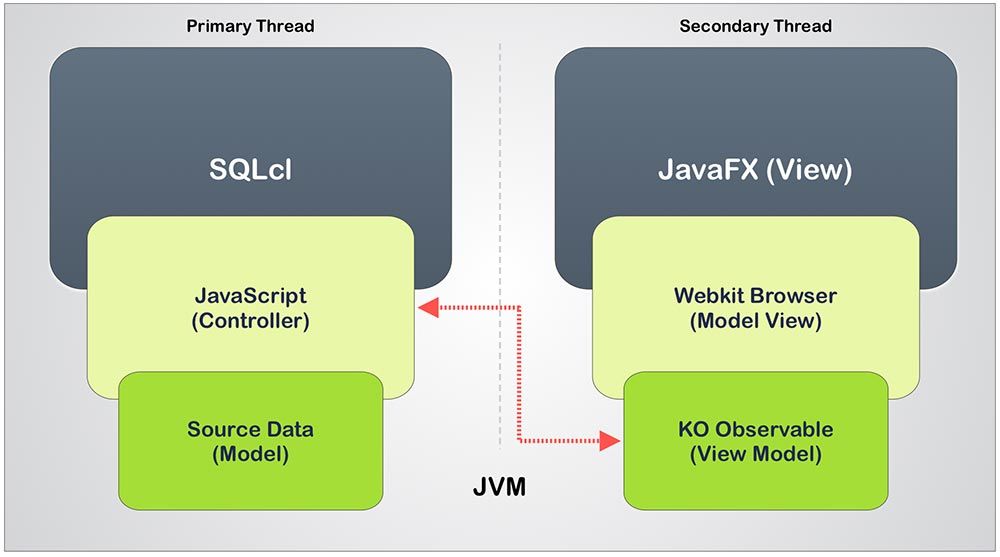
Communication with Knockout from JavaScript running in the same browser is trivial. _They are playing in the same sandbox_.
JS objects are created in your view model when the webpage is loaded.
```javascript
self.barSeriesValue = ko.observableArray(barSeries);
self.barGroupsValue = ko.observableArray(barGroups);
```
And then finally bindings are applied to your HTML elements when the document is ready, using something like this:
```javascript
function init() {
// Bind your ViewModel for the content of the whole page body.
ko.applyBindings(app, document.getElementById('globalBody'));
}
```
This post is related to a piece of code I am working on to [enable SQLcl to run Oracle JET charts](https://icodealot.com/preview-of-charting-in-sqlcl-via-oracle-jet/). In my overall example for this post we are adding one more layer of complexity. SQLcl needs to act as the controller for the `chart` command I am creating. Check out [this post](https://icodealot.com/preview-of-charting-in-sqlcl-via-oracle-jet/) for some background information.
> This is a very similar concept as [using Electron](https://icodealot.com/oracle-jet-native-apps-with-electron-and-node-js/) to pass data between an embedded Node.js application and an HTML view supporting the user interface.
What I need to do is to have SQLcl query some data from a database and then pass that data to the Oracle JET chart. This chart is built from HTML and JavaScript running in a separate thread as a JavaFX application.
## Possible solutions...
I am running two threads (one for SQLcl and another for JavaFX) locally in one process within the same JVM.
I shouldn't really need to think about "remote" calls.
There are a handful of approaches for trying to accomplishing the goal with the solution parameters given above.
1. Marshal objects back and forth between Nashorn and the WebKit browser. (Jim Laskey talks a lot about this [here](https://blogs.oracle.com/nashorn/porting-from-the-browser-to-nashornjavafx-part-i) with a `wrap(...)` function.)
2. Update view model values directly via assignment by getting a reference to the `Window` object from the embedded webkit browser.
3. Calling JavaScript functions in the WebKit browser to somehow trigger updates to the view model.
4. Calling back into the JavaFX application from the web application by [exposing a reference to a Java object](https://docs.oracle.com/javase/8/javafx/embedded-browser-tutorial/js-javafx.htm) to somehow trigger updates.
Jim's approach may ultimately be the right solution but I found assigning values to the Knockout generated observable objects a little tricky. I believe the marshaled objects are losing the function injected by Knockout. _I need to do some more testing on this._
With the second option I was able to get and assign values to the WebKit `window` and `document` object model (DOM) directly but I found that it also obliterates the Knockout.js `ko.observable` injected function.
## Current direction
For now I have opted to go with a variation of option 3 above. I am calling a `ko.observable` JavaScript function from SQLcl.
This works by string concatenation in SQLcl and is executed in the browser by JavaFX's WebView using `Engine.executeScript(...)`. For example:
```javascript
app.web.engine.executeScript("sqlclApp.chart.barSeriesValue(" + data + ");");
```
The reference to `sqlclApp` is a global variable for the Oracle JET `appController` created in the opening `require[]` block of `main.js`.
I may end up switching this out for a hybrid approach of Option 2 and 3. For example:
```javascript
var dom = web.engine.executeScript("window");
dom.setMember("temp", sqlclData); // Assign data for chart to a temp variable
web.engine.executeScript("update();"); // Call to update barSeriesValue from temp
```
# Sample code
Here is sample code for you to test this out on your own using the `jjs` command line utility that ships with Java 1.8+. You will need to have this installed before moving on. You will also need to be running this from a graphical operating system. We are "browsing the web" after all.
**1\. Pick a folder and create a new JavaScript file called simple.js and copy/paste in the following code or, even better, type it in if you are just learning.**
```javascript
// Declare class references from Java packages
var Platform = Java.type("javafx.application.Platform");
var Application = Java.type("javafx.application.Application");
var Stage = Java.type("javafx.stage.Stage");
var Scene = Java.type("javafx.scene.Scene");
var WebView = Java.type("javafx.scene.web.WebView");
// Declare global variables and functions
var web;
var dir = $ENV.PWD; // requires -scripting flag
var WebApp = Java.extend(Application, {
start: function(win) {
web = new WebView();
web.engine.load("file://${dir}/simple.html"); // requires -scripting flag
var scene = new Scene(web, 400, 400);
win.title = "WebView";
win.scene = scene;
win.show();
}
});
function html(message) {
Platform.runLater(new java.lang.Runnable ({ // Forced to run on JavaFX thread
run: function () {
var dom = web.engine.executeScript("window");
dom.setMember("data",message);
web.engine.executeScript("update();");
}
}));
}
// Start the JavaFX web browser in a separate thread
// ---- > because Application.launch() is a blocking call.
new java.lang.Thread(function () {
Application.launch(WebApp.class, null);
}).start();
```
**2\. Create a new HTML file in the same directory as the JavaScript file and call it simple.html then add the following HTML.**
```html
Demonstrate Nashorn Interaction
```
This HTML page includes an inline JavaScript function called `update()` that is used to update the contents of a `` with an ID of "content". This function will be called from Nashorn after updating the temporary variable called `data`.
**3\. Open your DOS or MacOS / Linux terminal and enter the following commands:**
```batch
cd
jjs -scripting
load("simple.js")
html("This is AWESOME!!!")
```
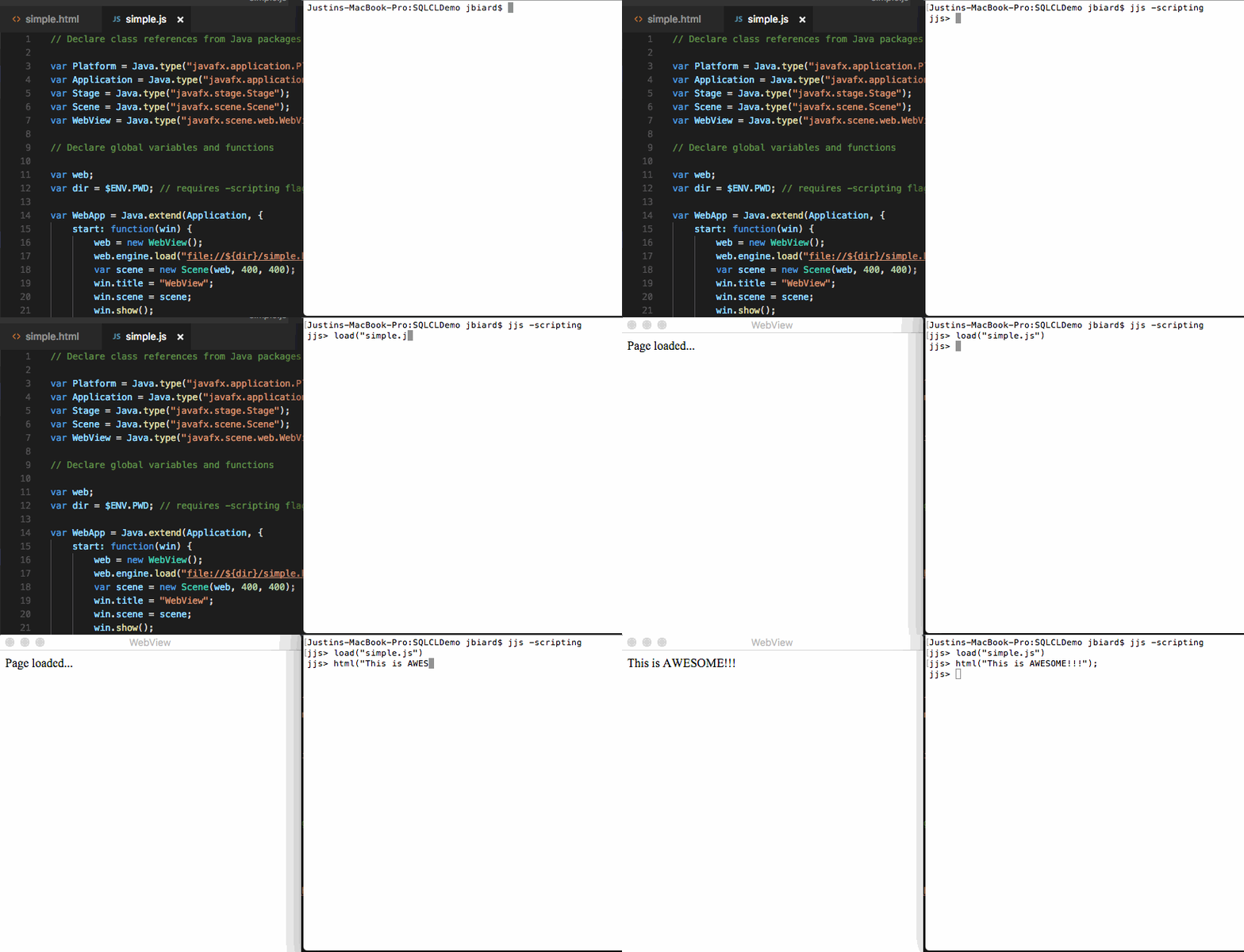
If everything goes well you should see something like the following console and WebView output. This is an example of Option 2 and Option 3 from above combined into a single example. _(i.e.: Setting a JS value and calling a JS function in the web browser from Nashorn.)_
## Summary
In this post we looked at several options for updating Knockout.js models from the Nashorn scripting context. I also talked about some pitfalls with trying to assign values directly to `ko.observable` functions vs. calling functions in the browser.
Finally, I wrapped up by giving some example code that you can run on your own using the `jjs` command-line utility that ships with Java 1.8+ to learn from and experiment with methods of updating the DOM from Nashorn.
This also demonstrates the concepts of multi-threading that are required because the JavaFX call to `launch()` is blocking.
Keep in mind that any updates you make to the WebView object need to happen on the JavaFX application thread. This requires you to use `Platform.runLater()` which will execute the enclosed code on the correct thread.
I hope you found this post to be useful.
Cheers!
_Cover photo by [Aaron Barnaby](https://unsplash.com/search/photos/machine?photo=PmrwuizKUq0) on Unsplash_